Тема, Мета, Місце розташування
Тема: Встановлення та налаштування середовища node.js. Основи роботи з express.js
Мета:
- Ознайомитися з принципами роботи HTTP-серверів.
- Вивчити основи створення веб-серверів на Node.js.
- Ознайомитися з архітектурою REST API.
- Навчитися створювати маршрути (routes) для обробки HTTP-запитів
Місце розташування:
Опис предметного середовища
Магазин книжок
Хід виконання
Backend-код
const express = require("express");
const cors = require("cors");

const app = express();
app.use(cors());
app.use(express.json());

let students = [];

app.get('/students', (req, res) => {
    res.json(students);
});

app.post('/students', (req, res) => {
    const student = req.body;
    students.push(student);
    res.json(student);
});

app.delete('/students/:id', (req, res) => {
    const id = req.params.id;
    students = students.filter(u => u.id != id);
    res.send(JSON.stringify(`Student ${id} was deleted`));
});

app.put('/students/:id', (req, res) => {
    const student = req.body;
    const id = req.params.id;
    const studentIndex = students.findIndex(u => u.id == id);
    students.splice(studentIndex, 1, student);
    res.send(JSON.stringify(`Data for Student ${id} was changed`));
});

app.listen(3000, () => {
    console.log("Server started on port 3000");
});
Frontend-код
fetch("http://localhost:3000/students", {
    method: 'POST',
    headers: { 'Content-Type': 'application/json' },
    body: JSON.stringify({ name: "Vasya", age: 19, id: 1 })
})
.then(response => response.json())
.then(response => console.log(response, "response"));

fetch("http://localhost:3000/students", {
    method: 'POST',
    headers: { 'Content-Type': 'application/json' },
    body: JSON.stringify({ name: "Olena", age: 85, id: 2 })
})
.then(response => {
    console.log(response, response.status)
    return response.json()
})
.then(response => console.log(response, "response"));

fetch("http://localhost:3000/students/1", {
    method: 'DELETE',
    headers: { 'Content-Type': 'application/json' },
})
.then(response => response.json())
.then(response => console.log(response, "response"));

fetch("http://localhost:3000/students/2", {
    method: 'PUT',
    headers: { 'Content-Type': 'application/json' },
    body: JSON.stringify({ name: "Kyryl", age: 35, id: 2 })
})
.then(response => response.json())
.then(response => console.log(response, "response"));

try {
    fetch("http://localhost:3000/students")
    .then(response => response.json())
    .then(response => console.log(response, "response"))
} catch (error) {
    console.error("Помилка запиту:", error);
}
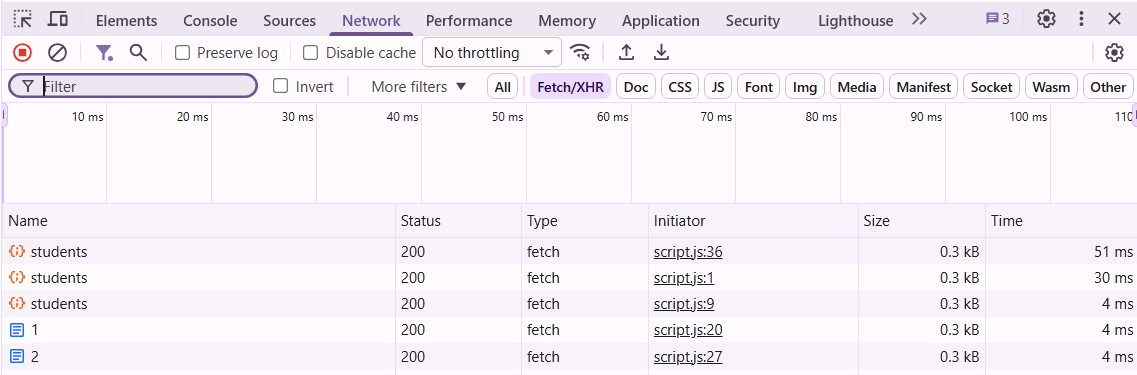
Скріншоти
Висновки
В цій лабораторній робботі я ознайомився з принципами роботи HTTP-серверів, вивчив основи створення веб-серверів на Node.js, ознайомився з архітектурою REST API, навчився створювати маршрути (routes) для обробки HTTP-запитів